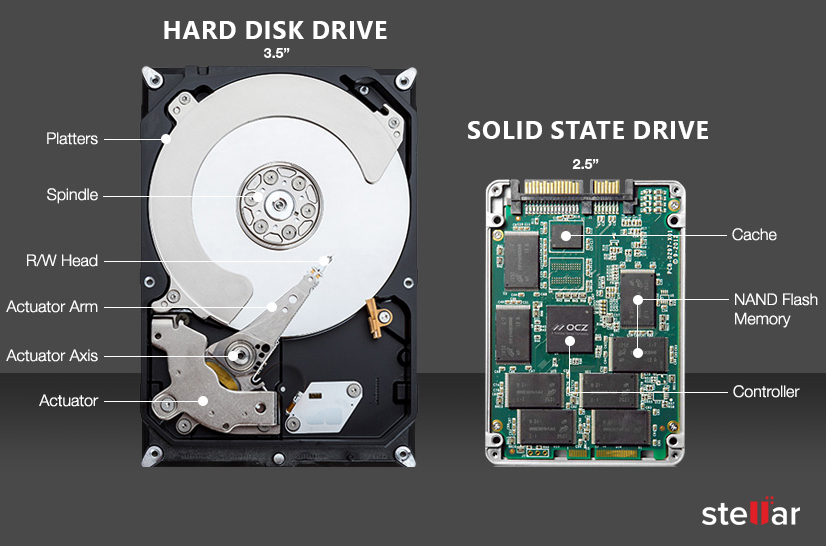
SSDs and HDDs basically do the same thing: store applications and personal files and boot systems. If you’re looking to add speed to an old desktop PC or laptop or if you’re choosing a drive for new PC builds, servers, or system builds, how do you know which to choose? Should it be an SSD (solid-state drive) or an HDD (hard disk drive)?
To start, the two are engineered in totally different ways. SSDs are built using a non-volatile storage technology called NAND flash and it doesn’t need power to retain data.
Since the mid-1950s, computers have used HDDs which are based on magnetic spinning platters. They use moving heads that read and write data to the spinning platters or disks. HDDs are mechanical devices with many moving parts and are more prone to mechanical failures and failures due to environmental conditions such as heat, cold, shock, and vibration.
If you bought a laptop or desktop PC anytime in the last few years, you almost certainly have a solid-state drive (SSD) as your computer’s primary boot drive. You can rest assured that you’re using the best storage technology available today. However, there’s an alternative for your secondary-storage needs: the long-familiar hard disk drive (HDD). In general, an HDD will be much slower than an SSD because it uses a vastly different, older storage technology—a spinning platter instead of memory cells. As a result, HDDs have nowadays been reduced to a secondary role in the consumer storage market.We can think of a few compelling reasons, though, that you’d still want an HDD, especially when buying an external drive for data backups or in a desktop PC with more than one drive. If you’re considering buying or upgrading one of these, you’ll need to understand the differences between SSDs and HDDs. We’ll walk you through the advantages and disadvantages of each so you can decide which one to choose.
The Basics: HDD and SSD Explained
The traditional spinning HDD is the basic non-volatile storage on a computer. (Unlike data stored in RAM, information on it doesn’t “go away” when you turn off the system.) A hard drive is essentially a metal platter or stack of platters with a magnetic coating that stores your data. A read/write head on an arm (or a parallel-mounted set of them) accesses the data while the platters are spinning.
An SSD performs the same basic function as a hard drive, but data is instead stored on interconnected flash-memory chips that retain the data even when no power flows through them. These flash chips (often dubbed “NAND”) are different than those used in USB thumb drives, and are typically faster and more reliable. SSDs are consequently more expensive than USB thumb drives of the same capacities
Like thumb drives, though, SSDs are often much smaller than HDDs and, therefore, offer manufacturers more flexibility in designing a PC. While some can be installed in traditional 2.5-inch or 3.5-inch hard drive bays, other models can be installed in a PCI Express expansion slot or even be mounted directly on the motherboard, a configuration that’s now common in laptops and desktops. (In most cases, these board-mounted SSDs use a form factor known as M.2. See our picks for the best M.2 SSDs and get much more info on these multifaceted types of SSDs.)
The Advantages and Disadvantages of SSDs and HDDs
Both solid-state and hard drives do the same job: They boot your system and store your applications and personal files. However, each type of storage has its own unique traits. How do they differ, and why would you want to get one over the other?
How Expensive Is an SSD vs. HDD?
Although they were once prohibitively costly, SSDs are no longer much more expensive than hard drives in terms of dollars per gigabyte. A 2TB internal 3.5-inch hard drive costs around $60, while the cheapest 2.5-inch SSDs of the same capacity start at around $90.
How Roomy Is an SSD vs. an HDD, in Maximum and Common Capacities?
Consumer SSDs come in capacities of up to 8TB, but these are expensive. You’re more likely to find 500GB or 1TB units as primary drives in systems. While 500GB is considered a “base” boot drive capacity for mainstream laptops these days, pricing concerns can push that down to 256GB for lower-priced SSD-based systems. Users with extensive media collections or who work in content creation will require even more, with 2TB and 4TB drives available in high-end systems.
Meanwhile, consumer desktop PCs with an SSD as a boot drive and one or more secondary HDDs typically offer HDDs with much greater capacities than the boot SSD. In this scenario, you could buy a desktop with a 1TB SSD boot drive and one or more 8TB or 16TB HDD secondary-storage drives, for example, though you can get individual hard drives in capacities up to 22TB.
How Fast Is SSD vs. HDD?
Speed is where solid-state really shines. An SSD-equipped PC will boot in less than a minute, often in seconds. Hard drives require time to speed up to operating specs, and will continue to be slower than SSDs during everyday use, which is another reason why they are no longer used as boot drives. A PC or Mac with an SSD boots faster, launches and runs apps faster, and transfers files faster.
A secondary issue to this is fragmentation. Because of their rotary recording surfaces, hard drives work best with larger files laid down in contiguous blocks. That way, the drive head can start and end its read in one continuous motion. When hard drives start to fill up, bits of large files end up scattered around the disk platter, causing the drive to suffer from what’s called “fragmentation.” While read/write algorithms have improved to the point that the effect is minimized, hard drives can still become fragmented to the point of affecting performance. SSDs can’t, however, because the lack of a physical read head means data can be stored anywhere without penalty. This contributes to SSDs’ inherently faster nature.
After the Galaxy Z Fold 6 and Z Flip 6 launch, the next big thing coming from Samsung is One UI 7 software. Samsung is expected to launch the One UI 7.0 beta next few weeks, followed by a stable release later this year.
what’s new in One UI 7.0.
Updated Icons
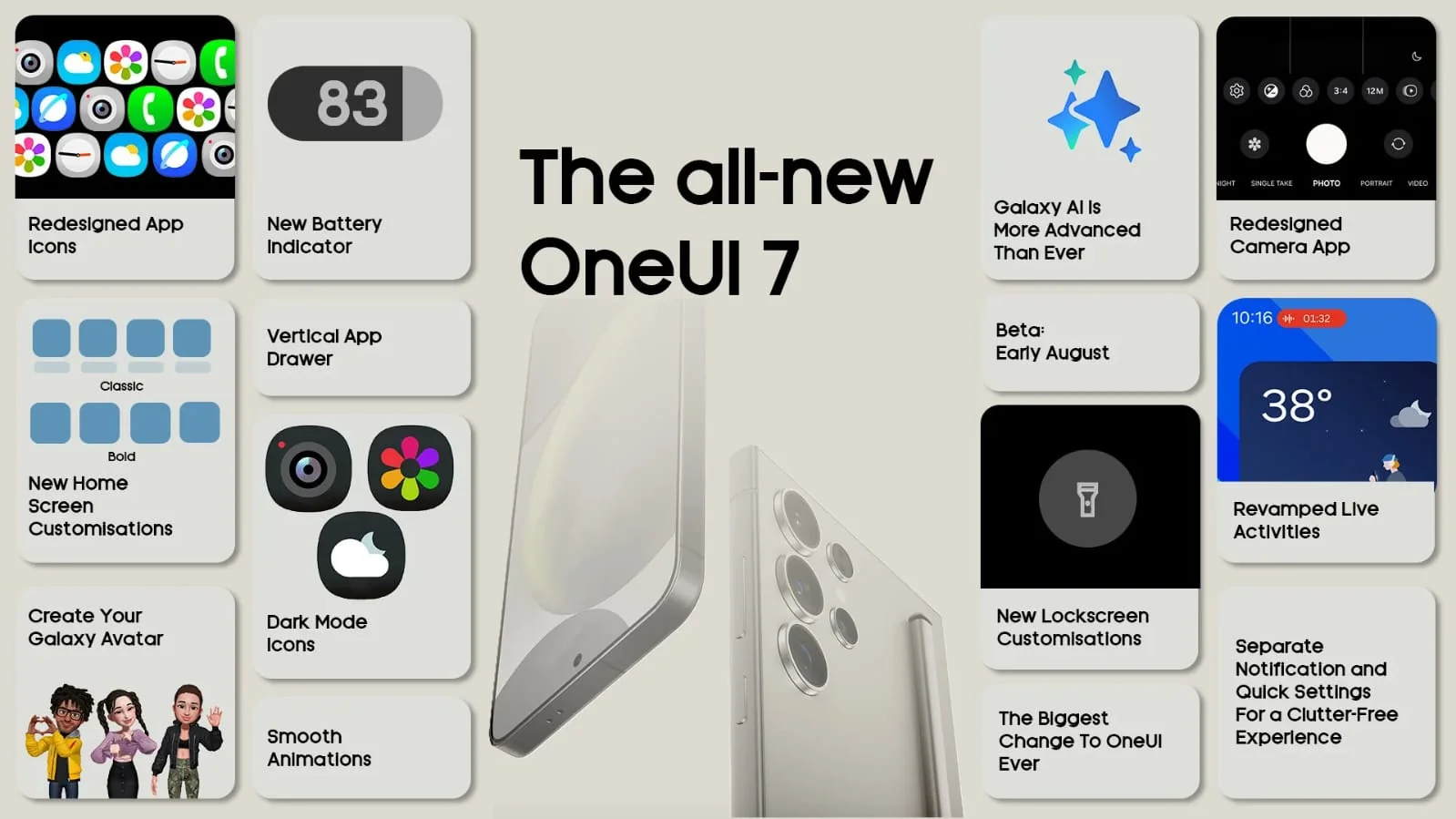
Samsung is introducing a completely new set of icons with One UI 7.0. The company is revamping all stock app icons, including Dialer, Contacts, Settings, Camera, Gallery, Browser, Theme, and more. These icons depart from the traditional Android Material Design aesthetic.
Image source: @vetrox360
The icons now incorporate gradients and shadows, giving them a 3D look. Additionally, they appear more rounded. The redesign extends to widgets as well, which now closely resemble those found on iOS 18.
All-new Camera UI
Perhaps one of the most noticeable UI changes has been made to the camera app. Leaked screenshots reveal that all major controls, including camera modes, quick controls, and zoom shortcuts, have been relocated to the bottom for easier access. Other shooting modes have been either added to a horizontal bar or a pop-up menu. This redesigned interface seems to blend elements from camera apps found on other major Android skins.
More Rounded UI Elements
Samsung seems to be embracing more rounded elements throughout the UI. Settings, Quick Actions, Notifications, and other components now feature softer edges. This approach seamlessly complements the redesigned icons.
Samsung’s own Dynamic Island
One UI 7.0 brings Samsung’s take on the Dynamic Island. There is a pill for system apps that has a similar animation to the Dynamic Island. Unlike iOS where the island is placed in the center, Samsung has chosen to keep the app pills on the left side of the notification area. You can see the app pill in action in this video below.
One UI 7 App Pill
Smoother Animations
We have heard reports of One UI 7.0 builds featuring more fluid animations on par with iOS and OPPO’s ColorOS. Our sources have confirmed these claims. However, as these findings are based on early software builds, the experience may change in subsequent updates.
Task continuity
This is a significant change primarily focused on enhancing the Samsung ecosystem and bringing it closer to iOS. One UI 7 will enable Galaxy users to seamlessly continue calls and video calls across devices. This means you could answer a call on your Galaxy smartphone and transfer it to your Galaxy Tab or TV with a simple gesture.
One UI 7 App Continuity
This app continuity will be available across all Galaxy devices, allowing users to not only transfer calls but also share cameras and storage.
Two-page Notification panel
This is perhaps the most controversial change in One UI 7.0. Samsung has adopted a design approach similar to Apple and Xiaomi by implementing a multi-page notification panel. This means separate dropdowns for notifications and quick settings, with notifications on the left and quick settings on the right.
One UI 7 Quick TogglesOne UI 7 Quick Toggles
More changes on the horizon
What we’ve covered here are just superficial UI changes. With One UI 7, Samsung is adopting a new identity that blends elements of Xiaomi’s HyperOS and iOS. Some of these changes are welcome, while others might be controversial. This is an early build, and significant alterations could occur before the final stable release.
Deadpool & Wolverine fans are itching to find out how they can win or buy the newly-released Deadpool Xbox controller.
Deadpool Xbox Controller & Console Revealed
Two Xbox X (formerly Twitter) accounts revealed information about a special collaboration for Deadpool-inspired Xbox console and controllers.
The controllers use the classic red color from Deadpool’s costume along with a couple of the straps seen on his leg around the controller handles. Also included is a small Deadpool logo on one of the handles.
The defining feature is the backside though, which is clearly meant to resemble a pair of supple butt cheeks.
This allows fans to get a little handsy with one of the most NSFW characters in all of comics, providing an interesting feel while holding the controller.
The post came with the following caption
“It’s actually perfectly ergonomic Introducing the Cheeky Controller designed by Deadpool. Marvel Studios’ ‘Deadpool and Wolverine,’ in theaters July 26.”
This image was shared by the Deadpool Canada X account:
The official Xbox account shared a look at a new console embracing the Deadpool theme, which comes with a set of the aforementioned controllers as well.
The console replicates the chest area of Deadpool’s costume down to the belt with the character’s logo. It also includes a strap from the shoulder, leading to a pair of katanas hanging off the back.
That post came with the following caption:
“Make his finest asset yours Follow & Repost with #XboxCheekyControllerSweepstakes for a chance to win a custom Xbox Series X console & 2 Cheeky Controllers designed by Deadpool. Ages 18+. Ends 8/11/24. Rules: http://xbx.lv/4cxoA4B
Marvel Studios’ ‘Deadpool and Wolverine,’ in theaters July 26”
The full image of the console and controllers together can be seen below:
How To Get Deadpool Controller & Console
Unfortunately, the Deadpool controller and console are not available for fans to buy in stores or online at this time. However, Xbox is currently running a sweepstakes for fans to get the chance to win them.
To enter, all fans need to do is have an X account, follow the Xbox account, and repost one of the designated promotional posts with the hashtag “#xboxcheekycontrollersweepstakes” during the entry period.
The contest started at 6 a.m. PT on July 17 and will be open until 8 p.m. PT on August 11.
The winner receives an Xbox Series X Console inspired by the movie, two custom Deadpool controllers, and a console stand.
Commentary: Samsung DeX lets me use my high-end smartphone as a lightweight laptop replacement. Almost.
Today’s Smartphones are more powerful than ever — and more expensive. With high-end models like the Iphone 15 Pro Max starting at $1,200 and Samsung’s Galaxy S24 Ultra going for $1,300, opting for a next-generation mobile phone is a major commitment.
As the costs of these devices rise, it gets more difficult to rationalize buying them, especially when there are more affordable cell phones that give these premium gadgets a run for their money. But what if your top-of-the-line smartphone could double as your computer?
With Samsung DeX, you can transform a Galaxy phone or tablet into a computer by simply plugging it into a monitor. You can also wirelessly connect Galaxy phones or tablets to certain TVs to use DeX.
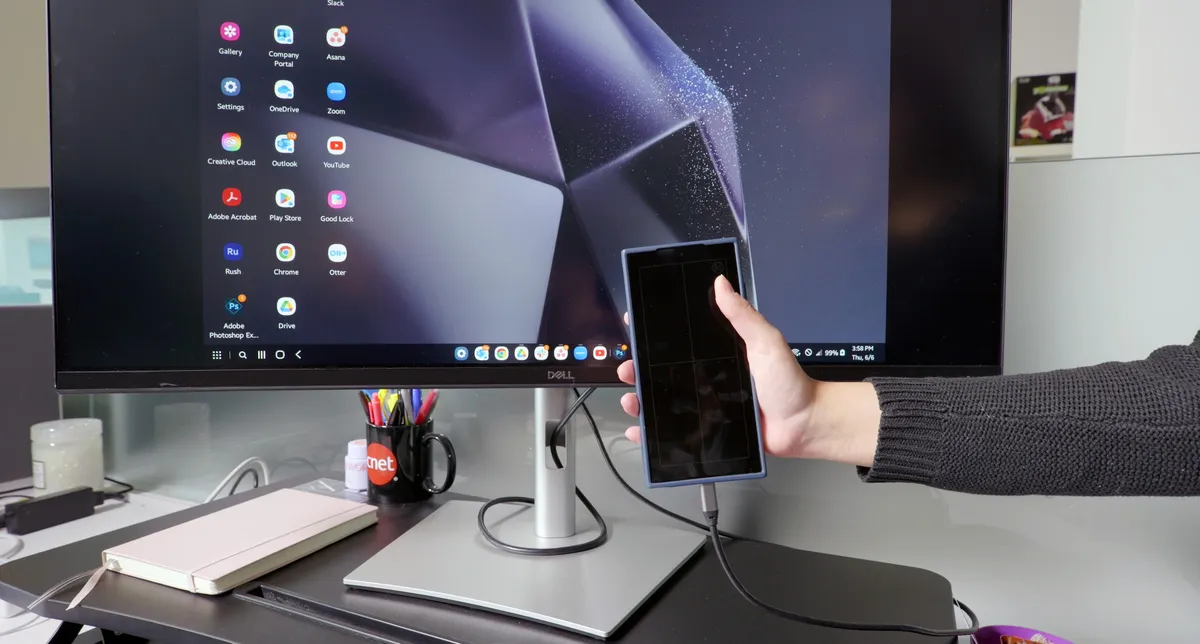
My monitor looks like its plugged into a laptop, but it’s all coming from the Galaxy S24 Ultra.
Since I use an iPhone, I had no idea this feature even existed until recently. The first time I tried it, my mind was blown. My monitor looked like it was plugged into a laptop, but it was all coming from the S24 Ultra. Still, I wasn’t sure if it could do everything my laptop could do, and I was determined to find out. So I ditched my MacBook for the day to see if the Galaxy S24 Ultra and Samsung DeX could replace it.
DeX just makes sense
Typing on my wireless Apple keyboard in DeX mode.
It felt weird to go to the office without my laptop. But it ended up being so nice to only carry the (roughly half-pound) S24 Ultra instead of my nearly five-pound MacBook Pro. I also loved that I could just connect the S24 Ultra to my Dell monitor at the office and control everything with the wireless Apple keyboard and mouse I already had. The fact that you can plug and play like this is, in my humble opinion, a big part of the beauty of the Samsung DeX.
As I worked, I noticed so many details about DeX that impressed me. For example, when I plug the S24 Ultra into my monitor, a four-panel screen appears on the phone. At first I wasn’t sure what it was for, but I eventually realized it was a trackpad I could use to move the cursor on the monitor. So if you don’t have a mouse, no problem. You can just use the phone itself. (Check out the video above to see how this works.)
If you look closely, you’ll see the four panel screen that appears on the S24 Ultra when I plug it into my Dell monitor.
Another cool detail is that you can still use your phone as a separate device even as it’s acting as your computer in DeX mode. So I could be, for example, editing a photo on my monitor while simultaneously using the S24 Ultra to do something totally different,
Ultimately, the more I used DeX, the more I realized it just makes sense. For instance, I always attend meetings with my laptop to take notes and pull up current projects. So when I couldn’t bring it to my one-on-one with my manager, I felt like I was showing up empty-handed. But in reality, everything I needed was (literally) in the palm of my hand. DeX closes the gap between phone and computer, so I wasn’t missing out by only being able to bring the S24 Ultra. It had the same information on it as the “computer” I was typing on minutes before with DeX. I was able to unplug the phone from my monitor, easily take notes and open my projects during the meeting, and then plug the S24 Ultra back into my monitor to keep working on those projects after the meeting. The transition from DeX mode, to phone, and back to DeX mode is seamless. It’s genius.
But how well can DeX actually handle all of my daily tasks? A lot of my days are spent testing products and scripting videos, and this was one of those days. I was, of course, trying out DeX, looking up any questions I had on Google Chrome and organizing my thoughts in Google Docs. I was also using Zoom and Slack to stay connected to everyone.
I keep my most frequently used apps in my DeX taskbar.
Using these applications in DeX mode was pretty similar to using them on my MacBook. Still, I did encounter a few hiccups that are worth noting if you’re thinking of trying DeX. Or if you’re a DeX expert — DeXpert? — maybe you can answer some of my questions.
Say goodbye to the Chrome bookmarks bar
You can have a bookmarks bar in the Samsung Internet app, but not in Google Chrome on DeX.
I’m an avid bookmarks bar user, so it pains me to say you can’t have one in Chrome on DeX. But you can have one in the Samsung Internet app, and for that reason alone, I would switch browsers if I didn’t need to use Chrome to log into certain work accounts.
Copying links also looks different in Chrome on DeX. You can’t click on a link to highlight it in the address bar and then go about copying and pasting it as you would in Chrome on a laptop. If you try to click on a link in DeX mode, it disappears. Instead, you have to click on the link, then click on the little icon to the right of it to copy it to your clipboard.
Can DeX replace my laptop?
The Galaxy S24 Ultra versus my MacBook Pro.Celso Bulgatti/CNET
So let’s return to the big question — can the S24 Ultra and, more specifically, Samsung DeX, replace my laptop? 90% of the time, yes. That being said, 10% of the time when I’m doing photo and video editing, no. But I’m so impressed that DeX can handle the bulk of my job. I will absolutely be bringing it into the office when I’m scripting and don’t want to carry a heavy bag, or am meeting up with friends after work and don’t want to lug my laptop around San Francisco.
I know that a day with DeX only scratches the surface of things. I’m sure I’ll continue to encounter little hiccups and discover more things I love about it. This whole experiment is also making me have an identity crisis. Like I said, I’m an iPhone girl but I am pretty impressed by what Samsung can do. Who knows, maybe one day I’ll switch over. Never say never. It would definitely make me feel better about the hefty amount I’ve come to spend on smartphones.
Zoom and Slack look a little different, too
When I first tried Zoom on DeX, my video appeared in portrait orientation instead of landscape, even though the S24 Ultra sat horizontally on my desk. But I turned the phone vertically and then horizontally again and my video finally switched to landscape. So the orientation was a little wonky at first, but it was easy to fix. Still, my video wasn’t perfect, but that’s because of my own DeX setup. I had a Zoom call with CNET’s Abrar Al-Heeti and Sean Booker, and the S24 Ultra was perched too low on my desk, so I was never really looking at them.
It’s probably a good idea to get a stand (or even a monitor mount) to raise the S24 Ultra so the camera is closer to my eyeline as I take Zoom calls. Additionally, when I sent a message in the chat, it took up the entire screen, which was a little clunky. And I couldn’t figure out how to switch from speaker to gallery mode so I could see everyone (that is, all two people) on the call at once.
Slack on DeX looks a lot like it does on my laptop, although it doesn’t have the sidebar with all of my recent messages where I can easily send a new one even if I’m in another conversation, which I did miss. And this is very specific, but I also missed being able to see who reacted to a message by hovering over the reaction. As far as I could tell, there’s no way to see who’s reacted to a message in Slack on DeX.
Admittedly, these are all very minor notes. None of them created any major disturbances in my workflow, which is what’s important. So I’d say DeX worked well for running the applications I use 90% of the time.
But that last 10% of the time I used two other applications — Adobe Premiere Pro and Photoshop. And while these aren’t available on DeX, Adobe Premiere Rush and Photoshop Express are. So I tried those. And — spoiler alert — I wasn’t as lucky with these apps.
Premiere Rush and Photoshop Express on DeX have so much potential
I like to think of Premiere Rush as a more accessible version of Premiere Pro. The interface is a lot simpler, you can use it on desktop and mobile (Pro is only available for desktop), and it’s free (Pro starts at $23 a month for individual users).
I do love Premiere Pro for the gamut of tools it offers. But most of the time, I’m doing pretty simple video editing anyway (i.e. trimming vlog clips like the ones in the video above), so I was hopeful that Rush on DeX could work for that. And at first, I was feeling good about it. I could easily make cuts in the middle of a video and trim clips down. I could even color-correct my footage. But the app kept abruptly closing on me every 30 seconds or so, which is sad because Rush on DeX seemed like it would’ve been able to handle the video editing I do for work.
I use Photoshop for simple image edits, like placing photos side by side, as well as adding borders and text to them. (Fun fact: I edited a lot of the photos you see in this article on Photoshop, including the ones below.) So I was curious whether I could use Photoshop Express, a free mobile photo editing app, for this kind of thing on DeX. But unfortunately, I can’t. While I could add text, I couldn’t find a way to put photos side by side or customize the borders around them like I do in Photoshop. But even though I can’t use this app for exactly what I do for work, I did have a lot of fun with what it can do. For example, I used it to put the overlays on the images below. (I would’ve had photos like these all over my Facebook if I had this app in middle school and am highly considering uploading one to my Instagram feed today).
I used Photoshop to add the line between the photos and the text, but those neat color overlays are all Photoshop Express.Clara Dingle/CNET
I don’t know if I should be saying this to Samsung or Adobe but one of you — or both of you — please make Photoshop and Premiere Pro available on DeX. It would take these already impressive products to the next level.
Google is working on a new Chromecast with Google TV device, and it looks drastically different from what we have seen so far.
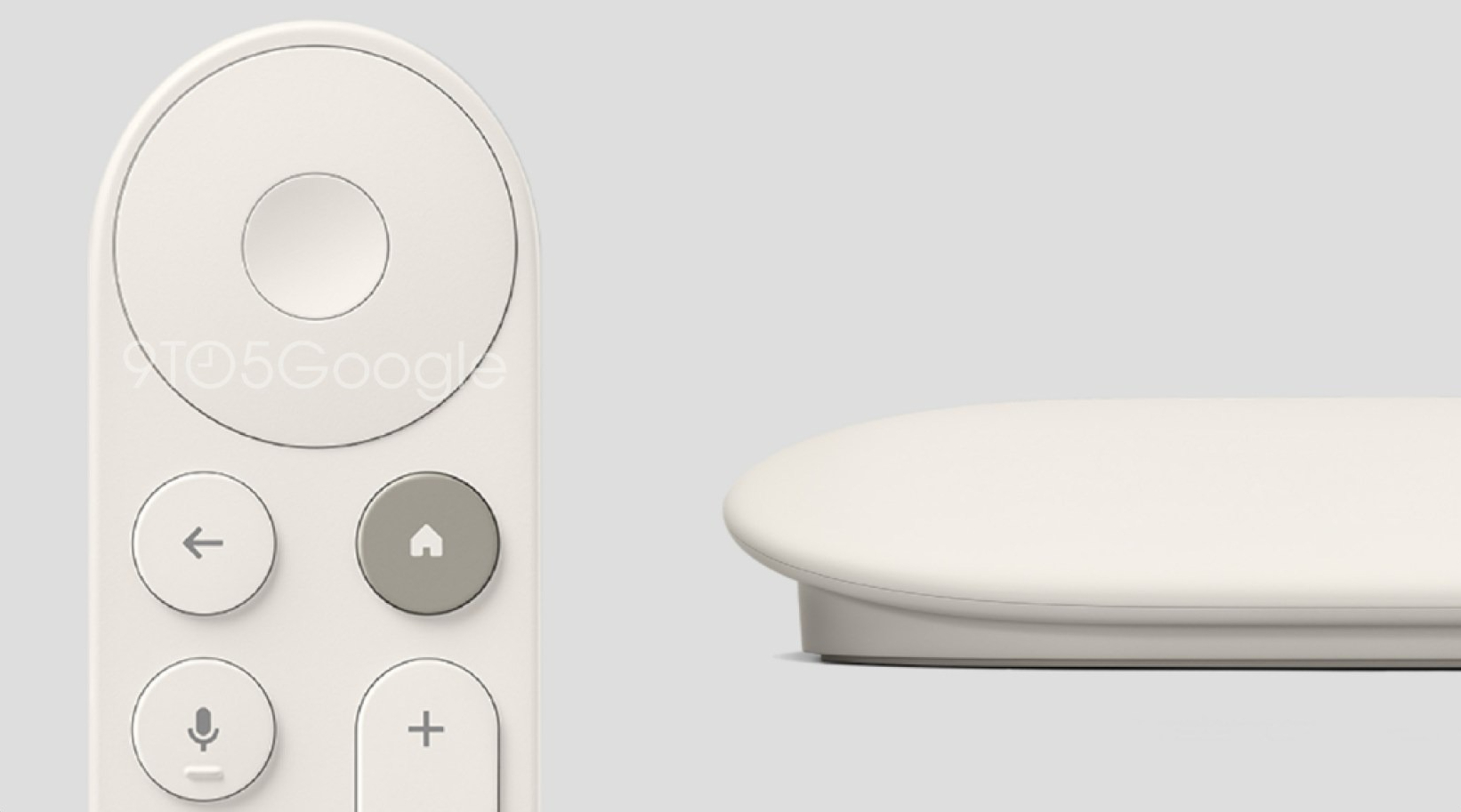
According to 9to5Google, it would be called TV Streamer and would have a set-top box design rather than an oval dongle. The remote would also get slightly redesigned but will keep its oval form.
Back in April, revealed that Google is working on a sequel to the Chromecast with Google TV (4K) from 2020. 9to5Google can now report that this upcoming device will be the “Google TV Streamer.”
Google is ditching the compact dongle form factor that plugs into your TV and remains out of sight.
The Google TV Streamer looks like it will be similar in size to a Pixel Tablet Charging Speaker Dock but more slanted. It has two cables coming out of the back; likely, one is the HDMI, and the other is the power cord. It may or may not have some display or touch capabilities; the source has no word on such features.
The remote might look the same, but the difference is now the volume keys are on the top rather than on the side. The Home key is now color-coded instead of the voice input key.
The voice button is now coming with a regular microphone image, instead of the Assistant logo, which is an understandable move as Google is working on merging its own AI engine, Gemini, with Assistant across all devices.
The Input/Source key is also getting changed – there is now a Magic symbol, which is likely to allow users to reprogram it to one of a few functions, including device inputs or app shortcuts.
Google is having a major event on August 13, when the new Pixel 9 phones will be unveiled. We also might see the TV Streamer get introduced, but we have to wait for further confirmation.
Apple typically releases its new iPhone series around mid-September, which means we are about two months out from the launch of the iPhone 16. Like the iPhone 15 series, this year’s lineup is expected to stick with four models – iPhone 16, iPhone 16 Plus, iPhone 16 Pro, and iPhone 16 Pro Max – although there are plenty of design differences and new features to take into account.
Larger Displays
Biggest Ever iPhones
This year’s iPhone 16 Pro and iPhone 16 Pro Max are rumored to be getting Bigger Display sizes. increasing to 6.27– and 6.86-inches, respectively. For comparison, the iPhone 15 Pro and iPhone 15 Pro Max are equipped with 6.1-inch and 6.7-inch displays, respectively. The new display sizes would be the largest ever for the iPhone.
Vertical Camera Layout
iPhone 16 & iPhone 16 Plus
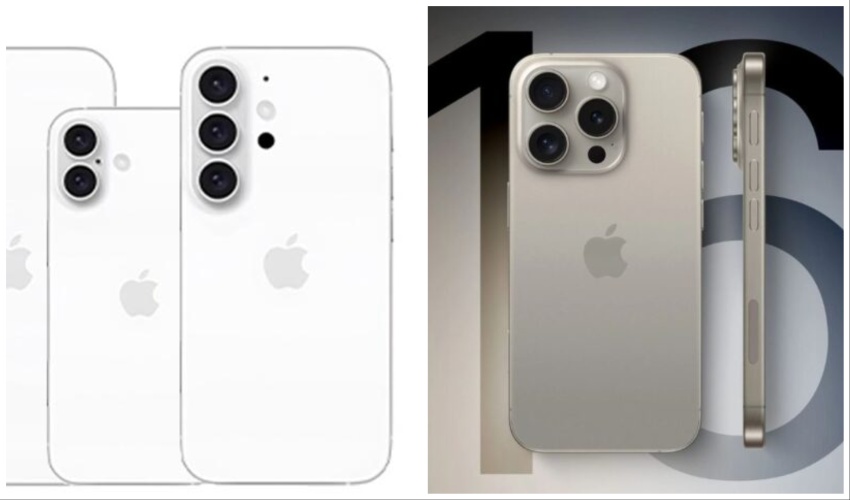
Apple’s iPhone 16 base models will feature a vertical camera arrangement with a pill-shaped raised surface, instead of a diagonal camera arrangement like the iPhone 15. The new camera bump features two separate camera rings for the Wide and Ultra Wide cameras. The vertical camera layout is expected to enable Spatial Video recording, which is currently limited to the iPhone 15 Pro models.
Battery Changes
All iPhone 16 Models
One rumor suggests the iPhone 16 and iPhone 16 Pro Max will feature larger batteries than their predecessors, but the iPhone 16 Plus may have reduced capacity. The iPhone 16 is said to have a 6% increase over the iPhone 15, with the iPhone 16 Pro Max gaining a 5% increase. In contrast, the iPhone 16 Plus is rumored to have a 9% reduction in capacity. On the other hand, Apple could also potentially use stacked battery technology to increase energy density and prolong lifespan across the lineup.
Capture Button
New Camera Capabilities
All iPhone 16 models will have a new Capture Button dedicated to triggering image or video capture. The button will add features like the ability to zoom in and out by swiping left and right on the button, focus on a subject with a light press, and activate a recording with a more forceful press. The Capture Button will be located on the bottom right side of the iPhone 16, and will take the place of the mmWave antenna on U.S. iPhone models, with the antenna relocating to the left side of the device below the volume and Action button
Ultra Wide Lens Upgrade
iPhone 16 Pro & iPhone 16 Pro Max
The iPhone 16 Pro models are expected to feature an upgraded 48 megapixel Ultra Wide camera lens which should allow it to capture more light, resulting in improved photos when shooting in 0.5× mode, especially in low-light environments. This also means that iPhone 16 Pro models should be able to shoot 48-megapixel ProRAW photos in Ultra Wide mode. These photos retain more detail in the image file for more editing flexibility, and can be printed at large sizes. The iPhone 16 Pro Max is also rumored to boast a bigger main camera thanks to an advanced custom 48-megapixel Sony IMX903 sensor.
Super Telephoto Camera
iPhone 16 Pro Max
The iPhone 16 Pro Max could be the first to feature a super telephoto periscope camera for dramatically increased optical zoom. “Super” or “ultra” telephoto usually describes cameras with a focal length of over 300mm. The current telephoto lens is equivalent to a 77mm lens, so if accurate, there could be a notable increase in zoom capabilities. Super telephoto cameras are often used for sports and wild animal photography, but the extremely soft backgrounds they create also make them useful for portrait photography, providing there is enough distance between the subject and the photographer.
Faster Wi-Fi Support
Wi-Fi 6E & Wi-Fi 7
Apple’s 2024 iPhone Pro models are expected to get Wi-Fi 7 in the Pro models enabling data transfer over the 2.4GHz, 5GHz, and 6GHz bands simultaneously. This should result in faster Wi-Fi speeds, lower latency, and more reliable connectivity. With technologies such as 4K QAM, Wi-Fi 7 is also expected to offer peak data transfer speeds of over 40 Gbps, a 4× increase over Wi-Fi 6E. Meanwhile, the iPhone 16 and iPhone 16 Plus is rumored to support Wi-Fi 6E which works with the 6 GHz band, enabling faster wireless speeds and reduced signal interference.
New A18 Series Chips
All iPhone 16 Models
Apple’s next-generation A18 Pro chip is expected to be manufactured with TSMC’s second-generation 3nm process, known as N3E. All four iPhone 16 models will be equipped with A18-branded chips, according to rumors, but Apple could still differentiate between the standard models and the Pro models, even giving the chips separate A18 and A18 Pro names. It makes sense for all four iPhone 16 models to have the same A18 chip because of the Apple Intelligence features set to debut in iOS 18. Apple Intelligence requires a high-powered chip for the AI features to run on-device. At this time, only the iPhone 15 Pro and Pro Max are able to use Apple Intelligence.
5G Qualcomm Modem
iPhone 16 Pro & iPhone 16 Pro Max
Apple is expected to use Qualcomm’s latest Snapdragon X75 modem in this year’s Pro and Pro Max models. The Snapdragon X75 includes improved carrier aggregation and other technology advancements for faster 5G download and upload speeds compared to the X70, which is used in iPhone 15 models. The modem’s combined mmWave and sub-6GHz 5G transceiver also takes up 25% less circuit board space, and is said to use up to 20% less power. The standard iPhone 16 and iPhone 16 Plus are expected to retain the Snapdragon X70 modem.
Tetraprism Lens
iPhone 16 Pro
Both iPhone 16 Pro models are expected to feature 5x optical zoom, which is currently exclusive to the iPhone 15 Pro Max. Apple’s tetraprism lens system has a “folded” design that allows it to fit inside the smartphone, enabling up to 5x optical zoom and up to 25x digital zoom. In contrast, the current smaller iPhone 15 Pro is limited to up to 3x optical zoom, which is in line with the iPhone 14 Pro and iPhone 14 Pro Max.
Micro-Lens Technology
More Efficient OLED
Apple is said to be weighing up the use of micro-lens technology to maintain or increase the brightness of OLED displays on next year’s iPhone 16 models while potentially reducing their power consumption. MLA works by using a uniform pattern of billions of lenses inside the panel that reduces internal reflections. These lenses turn the path of light reflected backwards from the inside of the panel towards the screen, which can serve either to increase perceived brightness while maintaining the same level of power consumption, or maintain brightness levels while consuming less power compared to conventional OLED panels at the same luminance.
Action Button non pro series
iPhone 16 & iPhone 16 Plus
The iPhone 15 Pro models include an Action Button, and in 2024, the Action Button is expected to be expanded to the standard iPhone 16 models. The Action Button used across the iPhone 16 lineup will be identical to the iPhone 15 Pro Action Button. The Action button, which replaces the traditional mute switch, can perform multiple functions such as activating the Flashlight, turning on the Camera, launching a Shortcut, enabling or disabling a Focus mode, using Translate, turning on/off Silent Mode, and more.
40W Fast Charging and 20W MagSafe
Both iPhone 16 Pro Models
The iPhone 16 Pro and iPhone 16 Pro Max will support 40W wired fast charging and 20W MagSafe charging, according to a rumor. Right now, iPhone 15 and iPhone 15 Pro models are capable of up to 27W peak charging speeds with an appropriate USB-C power adapter, while official MagSafe chargers from Apple and authorized third parties can wirelessly charge the iPhone 15 models at up to 15W. The charging boost is expected to balance and improve the problem of increasing charging time caused by the increase in battery capacity.
New Thermal Design
Reduced Heat
Apple is rumored to be working on a graphene thermal system for the iPhone 16 lineup, while the iPhone 16 Pro models could add metal battery casings to reduce overheating. Graphene has high thermal conductivity, surpassing that of copper, which is currently used in iPhone heat-sinks. Apple has been filing patents related to using graphene for thermal management for some time. The move could be in response to widely encountered overheating issues experienced with the iPhone 15 Pro, which Apple addressed through a software update.
Expanded Storage
Both iPhone 16 Pro Models
The iPhone 16 Pro and iPhone 16 Pro Max will be available with double the maximum storage capacity as the iPhone 15 Pro models, increasing from 1TB to 2TB, according to one rumor. The move is said to be a result of Apple’s switch to higher-density Quad-Level Cell (QLC) NAND flash for higher storage models. Apple’s use of QLC NAND could allow Apple to fit more storage into a smaller space and it is less expensive than Triple-Level Cell (TLC) NAND, which current iPhones use. On the downside, QLC has comparatively slower read and write speeds.
Increased Ram Memory
iPhone 16 & iPhone 16 Plus
Apple’s iPhone 16 and iPhone 16 Plus models have been rumored to both feature 8GB of RAM, an increase over the 6GB of RAM in the iPhone 15 and iPhone 15 Plus. More working memory should equate to improved performance for multitasking on the iPhone. Apple has hinted. that plenty of RAM is required for Apple Intelligence features, so it is perhaps no coincidence that all devices in the iPhone 16 lineup will have at least 8GB of RAM.
Ultra-Thin Bezel Technology
Maximized Display Size
Apple plans to maximize the display size on the iPhone 16 series by using a new ultra-thin bezel technology, according to one rumor. Apple will use Border Reduction Structure (BRS) technology to minimize the bezel at the bottom of the display. BRS achieves this by rolling up the internal copper wiring into a more compact package. Apple reportedly plans to apply the borderless display technology to all four iPhone 16 models, but the Pro models will have the thinnest bezels of any smartphone, beating the screen border thinness of even its latest iPhone 15 Pro devices.
New Colors
All iPhone 16 Models
The iPhone 16 Pro and iPhone 16 Pro Max are expected to be available in black, white or silver, gray or “Natural Titanium,” and rose. This suggests that the iPhone 15 Pro’s Blue Titanium option will be discontinued and replaced with a new rose color. Meanwhile, the iPhone 16 and iPhone 16 Plus is said to be coming in black, green, pink, blue, and white. Compared to the iPhone 15, this means that white will replace yellow, with the other colors remaining the same.
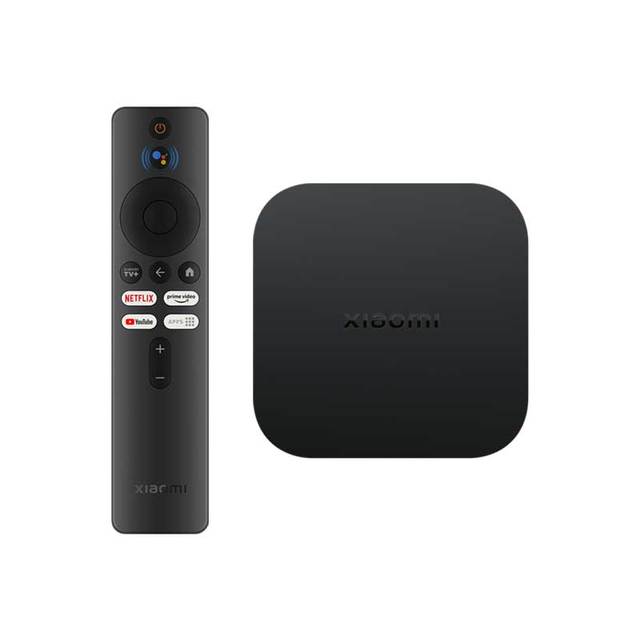
Xiaomi Mi TV Box S 2nd generation specifications These are the improvements
Xiaomi Mi TV Box S 2nd Gen is an improved version of the Mi Box s
As for the design, apart from the change of the logo on the top cover, nothing has changed. It’s still a compact streaming box, measuring 95.25 x 95.25 x 16.7mm and weighing 147g. However, the specification and features offered by the 2nd generation Mi Box S are worth attention. First of all, inside we find the already well-known SoC (Quad-core Arm Cortex-A55 processor 2.0 GHz with ARM-G31 MP2 GPU) that supports up to 4K @60fps AV1, VP9, HEVC decoding with HDR10/10+ and HLG. In addition, the new Xiaomi streaming Box supports Dolby Vision Dolby, Dolby Atmos, and DTS-HD.
The improved Xiaomi TV Box is a certified Google, Netflix and Prime Video streaming player. It also offers support for other streaming services with up to 4K display. Compared to the previous version which had built-in Android TV 9.0. Xiaomi TV Box S runs on Google TV based on Android TV 11 OS.
Still inside we find 2GB RAM DDR4 and unfortunately only 8GB eMMC storage. In addition, the streaming player supports Dual-Band 802.11ac WiFi 5 and Bluetooth 5.2. As before, the device does not have RJ45 Ethernet. The interfaces it has are HDMI 2.0a, USB 2.0, 3.5mm headphone jack, and DC jack.
Xiaomi Google TV Streaming player comes with Bluetooth and IR remote control. The refreshed remote control received several key buttons for Netflix, Youtube, Prime Video and Apps. In addition, we will find a button for Xiaomi TV+ (IPTV) and Google Assistant.
Google TV operating system and Bluetooth controller with voice commands
Among the functions, we must mention support 4K resolution (2160p). However, this is supplemented in this case by the support of standards Dolby Vision, Dolby Atmos, dts-HD a HDR10 +. This will be especially appreciated by lovers of multimedia entertainment and movies.
In addition, a new operating system is also available GoogleTV. As well as integrated Chromecast (content sharing) whether support for voice commands via Google Now(via the microphone on the control). In terms of connectivity, a USB-A port is available (2.0), HDMI port (2.0), 3,5 mm audio connector and DC connector for connecting to the network.
The sales package of this product includes the smart TV box itself with the label Xiaomi Mi TV Box 2nd generation, together with original accessories from the manufacturer. This constitutes the mains supply (EU Plug, 220-240 V / 50-60 Hz), HDMI cable to connect to your TV, remote control with voice control. As well as a brief instruction manual, traditionally in English.
How do you like this practical smart TV box from the company’s workshop? Xiaomi? If you have any other questions about the integrated components or the selling price, feel free to write them to us below in the discussion under the article.
Also follow our website ,full of current articles, subscribe to the news and join us Powerplay.pk
In the rapidly evolving landscape of technology, staying informed about the latest gadgets, electronics, and innovations is crucial for enthusiasts and consumers alike. Fortunately, Pakistan has seen a surge in tech reviews websites, providing insightful and detailed analyses of various products. In this blog post, we’ll explore some of the best tech review websites in Pakistan that are making waves in the industry.
ProPakistani: ProPakistani stands out as one of the leading tech news and reviews platforms in Pakistan. Renowned for its in-depth reviews, the website covers a wide range of products, from smartphones and laptops to cameras and accessories. The reviews are well-researched and offer a comprehensive understanding of the featured tech, making it a go-to source for tech enthusiasts.
TechJuice: TechJuice has carved a niche for itself in the Pakistani tech community by providing up-to-date and engaging content. Their reviews cover a diverse range of products and often include hands-on experiences, making it easier for readers to relate to the features and functionalities. TechJuice also focuses on emerging technologies and startups, offering a holistic view of the tech ecosystem.
PhoneWorld: Specializing in smartphone reviews, PhoneWorld has become a trusted name for those seeking information about the latest mobile devices. The website thoroughly tests and evaluates smartphones, presenting readers with detailed insights into performance, camera quality, and overall user experience. PhoneWorld is particularly valuable for consumers looking to make informed decisions about their next smartphone purchase.
MoreNews: MoreNews is not just limited to tech but covers a wide array of topics, including technology. Known for its engaging content and user-friendly interface, MoreNews provides tech reviews that are easy to understand. The website often incorporates video reviews, offering a visual perspective that complements the written content.
WhatMobile: Focusing primarily on mobile phones, WhatMobile has become a staple for those seeking comprehensive information about the latest smartphones available in Pakistan. The website includes detailed specifications, expert reviews, and user opinions, creating a well-rounded perspective for potential buyers.
Conclusion: The tech reviews landscape in Pakistan is flourishing, with various websites catering to the diverse needs of consumers. Whether you’re looking for in-depth analyses, hands-on experiences, or comprehensive specifications, these platforms offer valuable insights to help you make informed decisions in the fast-paced world of technology. As technology continues to advance, these websites will play a crucial role in keeping the Pakistani audience well-informed and tech-savvy. Discover the review master website Our expert reviewers bring you insightful and honest reviews about local businesses, events, and hidden gems. Your go-to source for all things local.
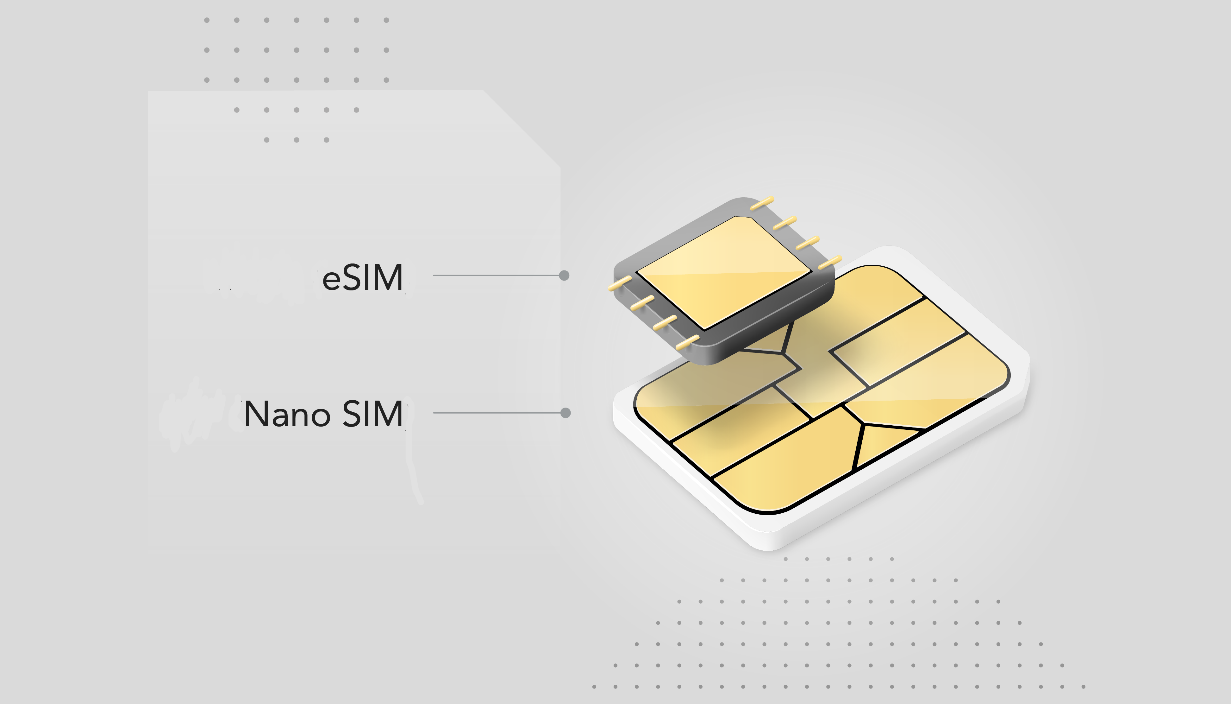
In the latest Android 13 will allow Two Carriers on a Single eSim. Google is working on a patented tech that would allow users to activate two cellular connection lines from different carriers on a single eSIM.
This latest Android feature is called Multiple Enabled Profiles, or MEP in short, and it will likely be enabled with the arrival of Android 13.
You can read more about this new feature in a detailed review by Esper’s Mishaal Rahman. According to him, MEP is a software-based solution for activating two profiles on a single eSIM.
A standard eSIM system only allows a single SIM profile to remain active at a time. Even though it can store multiple profiles simultaneously. And that means if you want to maintain two cellular lines on your phone. It must either have two separate eSIM slots. Or a hybrid eSIM + physical SIM system.
Google’s MEP proposes a system of logical interfaces that can create two communication channels on a single physical connection. Each logical channel can carry a SIM profile. This means a single physical connection can route two SIM profiles to the modem from one eSIM enclosure.
So if your phone has an eSIM slot and is Android 13 compatible then you will be able to utilize this feature. Google has reportedly been testing MEP on Pixel phones. On Pixel phones, the underlying MEP modifications will be handled by the pre-installed SIM Manager app.
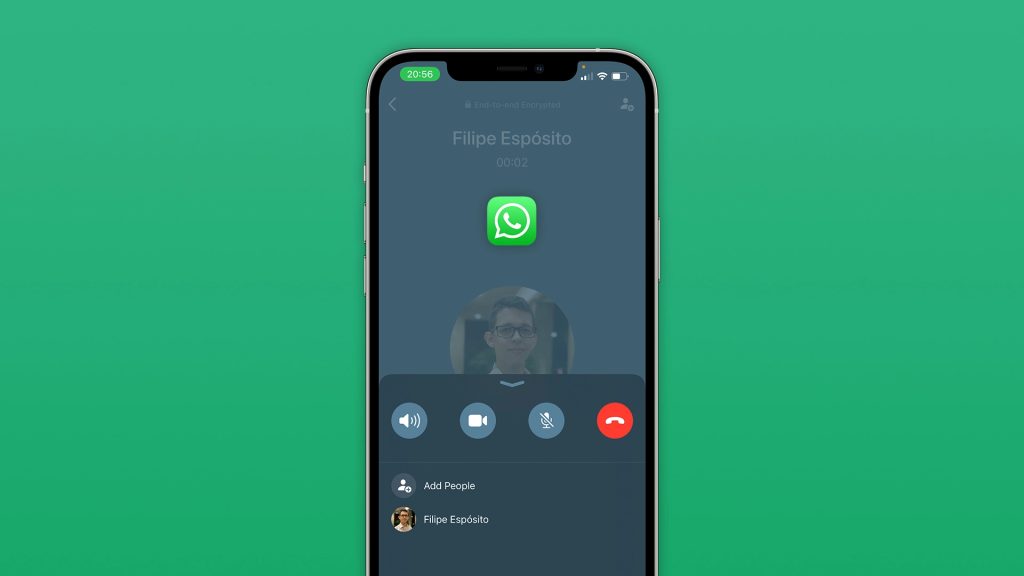
WhatsApp New voice calling interface is here for beta users of the service. The new interface separates group callers into distinct color-coded cards and adds individual audio waveforms. The feature was first spotted on Android back in December of 2021 when select beta testers got their hands on the update.
As stated by WABetaInfo, the feature is available as part of the version 22.5.0.70 update. And brings the updated interface to some beta testers on the Apple ecosystem. When in group calls, WhatsApp separates the members onto different corners as cards and assigns real-time. With color-coded audio waveforms to each speaker.
WhatsApp New voice calling interface
Similar to Discord, the indicator will now inform users about active speakers and flatline when they stop talking. The report also mentions a background wallpaper feature for voice calls, though it cannot be edited at the moment.
The new WhatsApp voice call interface would come with a round grey square in the front and center. It will also house the contact name, number, and profile picture.
WhatsApp is planning to bring real-time voice waveforms to calls as well, this will allow the caller to be able to know exactly who is talking.
The messenger service has been spotted working on a new screen for responding to users about their account ban reviews. They are also working towards releasing the ‘Community’ feature in a future update.
Community is a private place where group admins will have more control over some groups on WhatsApp. Do lets us know if you are able to spot any beta test features by commenting below.